The digital payment solution app works quite similar to other UPI-enabled apps. Here’s everything you need to know

Taru Bhatia | January 2, 2017 | New Delhi
Transferring and receiving money in banks was not easy until the launch of united payment interface (UPI)-based mobile banking, a product of national payments corporation of India (NPCI), a government organisation for all retail payment system in India, last year.
On December 30, the government launched Bharat Interface for Money (BHIM), a mobile application for digital banking. The app enables users to transfer money to another person’s bank account by simply using their virtual payment address (VPA). VPA is a unique feature of UPI that cuts down the process of entering beneficiary’s account details such as name, account number and IFS code, and then waiting for minimum an hour for the registration of the beneficiary’s account to make the transfer.
BHIM app, which runs on UPI, is available for download on Android’s Play Store. It is expected that the app will be available for iOS users within a month’s time. Currently, it is available in English and Hindi languages but soon the app will available in other Indian languages.
BHIM is not the first UPI-based smartphone application. Major Banks such as State Bank of India, Axis Bank, Punjab National Bank, ICICI Bank, among others, have already launched a separate m-application that is UPI compatible. It is a similar application that is designed to pay and collect money directly from the registered bank account. At present, the app is linked with 31 banks.
So far, more than 84,000 people have downloaded the app via Play Store.
How to use
Starting with BHIM application is not complicated. Once downloaded from the Play Store, it doesn’t ask many details of bank account and debit card. Instead, it asks users to submit their bank name and the registered mobile number.
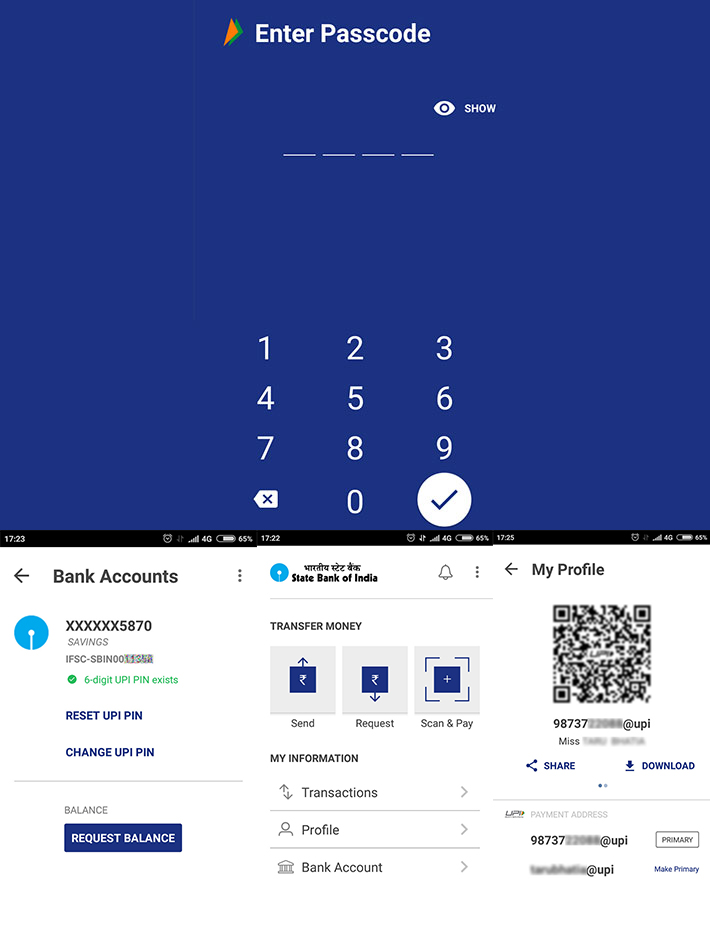
The server then automatically links the bank with the app by getting the IFC code. For security, it asks user to set up a six-digit PIN code.
By default, user’s virtual payment address (VPA) is generated using their mobile number. It looks something like 1234567890@upi. The user, however, can change their payment address and use it as their primary address for making transactions.
Both VPAs will have separate quick response (QR) code, used for machine to machine communication to identify the beneficiary.
VPA is one of the unique features of the UPI that enables users to make easy money transfer to bank accounts, without entering details such as account number, account holder name and IFC code.
Transferring money is simple. One has to type the other person’s UPI virtual address and send money. The beneficiary to whom the money will be transferred needs to be a registered user of any UPI-compatible app including BHIM, of course.
One can also transfer money by scanning the beneficiary’s QR code, which is provided in the app itself.
Users can also request for money. Users have to select the request option and then type the VPA of the person from whom they are requesting money. Then user has to type in the amount they wish to receive and generate a request. A message of request will go the person’s inbox.
Review
Sending and receiving money are the core features of this application. But the app can also be used to check the balance of the registered bank account. Other than these, VPA makes digital banking easy and simple as it eliminates the process of typing multiple details.
Confusion that I faced using BHIM application was to find out which bank is presently active for receiving and sending money in the app.
Under ‘My Information’ in the application, clicking on ‘Bank Account’ option, one can see details of only one registered bank account. For your information, any UPI-enable application allows user to manage their multiple bank accounts in one app.
To register another bank account, one has to click on the left side and select the option of ‘change account’. User can select another bank account, which they wish to use for making transactions.
To register the second bank account, user has to feed in details of their debit card and set separate PIN code for the second bank account.
Even though the BHIM app allows registering multiple bank accounts, it doesn’t allow user to use them at the same time. User can use one bank account at a time for sending or receiving. VPA will remain common for all registered bank accounts one has in the BHIM app. This feature may not be liked by all users and it might also confuse them.
This is not similar to other UPI-enable apps. For example, in the Axis Bank UPI app which I use, one can register multiple bank accounts and set different VPA for different account. I have registered two bank accounts in the Axis Pay app and both have different VPA. I am using both of the accounts at the same time for sending and receiving money, unlike in BHIM app.
While registering my second bank account in the app I found that the processor was slow. It could be due to multiple factors such as connectivity failure or congestion in the bank's server.
Except for this, features of BHIM are quite similar to other UPI-enabled apps.
For decades, policing has followed a familiar sequence: a crime occurs, the police respond, an investigation produces records and those records become part of the institutional memory of the criminal justice system. Artificial intelligence is beginning to alter that sequence. Instead of merely recording
“We are making a Constitution forever and not only for today.” Shibban Lal Saksena said this in the Constituent Assembly on June 15, 1949. He was warning that a ruling party might one day choose a loyalist to run India’s elections. Seventy-seven years later, the Supreme Court is wrestli
The Cabinet Committee on Economic Affairs (CCEA), chaired by prime minister Narendra Modi, has approved implementation of the ITMS Project by Delhi Police at an estimated cost of Rs.1,789.52 crore, inclusive of taxes. The project will cover 42 identified traffic corridors and will be implemented in three
The extraordinary transaction volumes and value (₹29.82 Lakh crore in August 2026 alone) of the Unified Payments Interface (UPI) have made it not only an Indian success story, but a global one. In 2024, UPI accounted for nearly 49% of the world’s real-time payment transaction volume, with more th
Diplomacy is akin to an art, wherein the summitry, conflict resolution and negotiations form apt constituents of the entire context of deal making and “playing for keeps” in the international arena. The Xi-Trump summit in Washington last week, in which the American president broke all conside
Moving to Delhi-NCR for education can be an exciting experience for students from Northeast India. It gives us a chance to meet new people, experience a different culture and become more independent. But living away from home also comes with challenges that people who have not experienced them may not al